Customer Detail |
Top Previous Next |



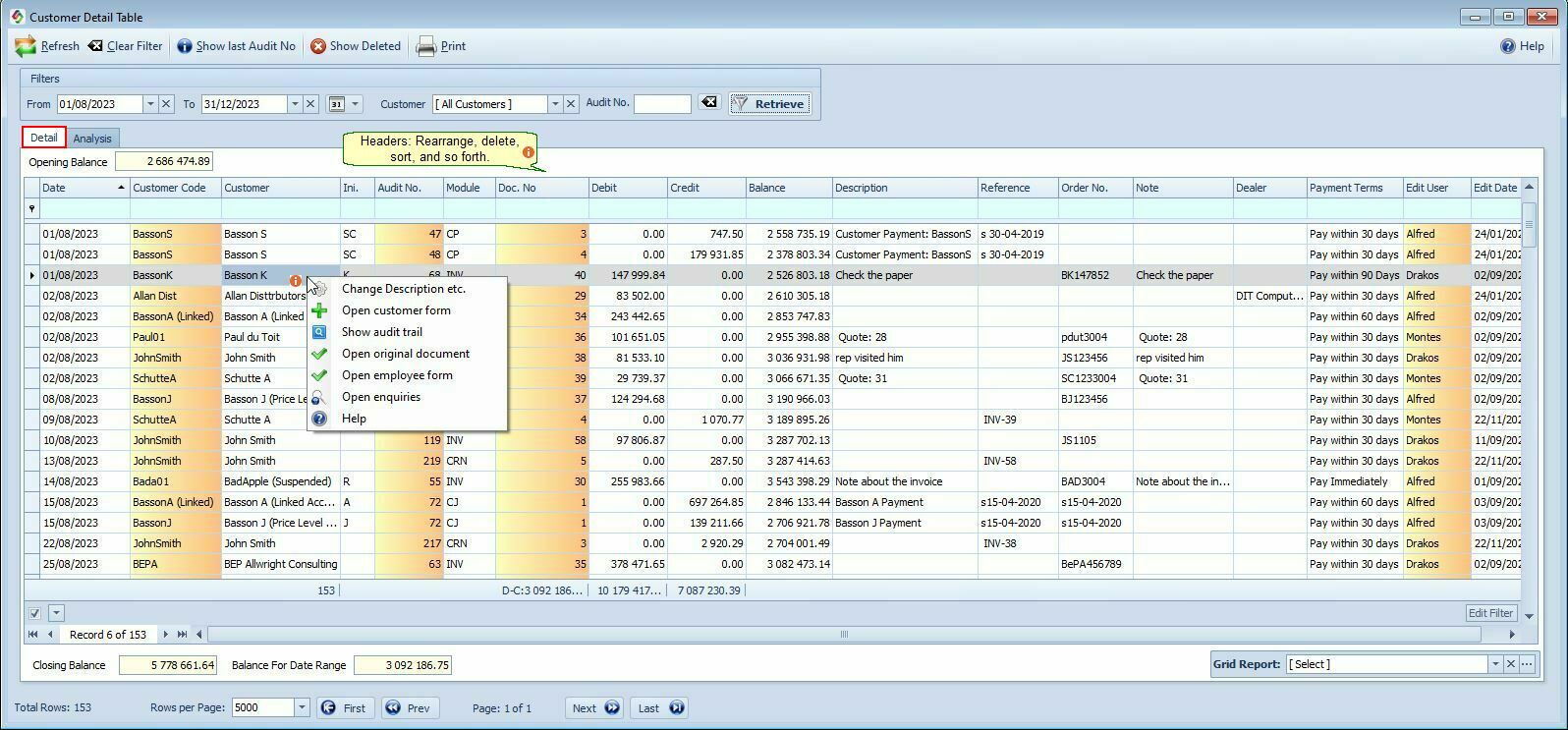
Customer Detail Form
Go to: Customer > Customer Detail
All customer transactions are recorded here, including:
Customer Journals (CJ), Cash Payments (CP), Credit Notes (CRN), Invoices (INV), Interest, Electronic Fund Transfers (EFT), Bank Manager Module (BMD).
Right-click on the row selector to edit the Reference, Description, or Note fields.
Hover the mouse over the different fields on the form. If the cursor changes to a hand ( ) , click to get more information.
Customer Detail Menu Items |
|
Show Deleted |
All deleted entries will be listed here. |
Customer Detail Columns Explained |
|
Module |
Indicates where the entry originated (e.g. Invoice, Payment, Credit Note). Tip: Type an abbreviation (e.g., CP) in the filter row to display all customer payments. → [Click here to view module abbreviation list.]
|
Debit / Credit Column |
Use mathematical operators in the filter row to search for amounts: (<, >, >=, <= , <> (Is Not), = )
|
Doc. No |
Displays the document number (for example, Invoice Number). •Double-click to open the original document.
|
Balance |
Balance •When using the blue filter row, the balance column is hidden. •When applying the supplied Customer and/or Date Range filters, the balance remains visible.
|
Description & Reference |
Description column's data is sourced from the Invoice Note Field (found under Customer > More tab). Reference column's data is sourced from the Customer Payment form.
|
Right-Click Menu In The Customer Detail Form Right-click on any transaction row to access the following options:
|
|
Change Description etc |
Edit the reference, description, or note fields directly. These fields can also be edited from the Customer Enquiry form. See also: Invoice Corrections and General Ledger Corrections.
|
Open Customer Form |
Opens the selected customer’s master record.
|
Show Audit trail |
Displays the journal entries (debits and credits) for the selected transaction.
|
Open Original Document |
Opens the source document related to the transaction, such as: •Invoice •Goods Received •Credit Note •Receipt
Example: If the module column shows CP, the Customer Receipt will open.
|
Open Employee Form |
Open the Employee Form for the employee who processed the transaction. See the Employee Column in the SI+ program.
|
Open Enquiries |
Opens the Customer Enquiries & Allocation Form
|
Grid Reports in Customer Detail.
You can use Grid Reports to save frequently used views or load existing ones (for example, All Payments).
Common Customer Detail Reports
•All Payments.
made via the :
• Receive Payment Module (CP)
• Customer Journal (CJ)
• On Account Invoices that were paid (INVPay)
•All debit orders processed.
•Interest charged on late payments this month.
•Employees with highest amount of credit notes. Use the Analysis Report.
Best Practice Tips
✅ Use module abbreviations in filters to quickly isolate transaction types
✅ Save common views as Grid Reports for fast access
✅ Use Audit Trail before making corrections to ensure accounting accuracy