Add or Edit Recurring Invoices |
Top Previous Next |
Hover the mouse over the different menu options. If the cursor changes to a hand ( ), then click to go to the subject.


Add or Edit Recurring Invoices
Go to: Invoice > Recurring Invoices
The Recurring Invoice Lookup screen opens, showing all active recurring templates.
Creating or Editing a Recurring Invoice
•To add a new recurring invoice, click New Recurring Invoice (or press F5).
•To edit an existing recurring invoice:
•Double-click the Recurring Inv. No., or
•Right-click the row and select Open Recurring Invoice.
1. Enter all required items/services (e.g., "Monthly Maintenance Fee", "Photocopier Rental").
2. Set Quantity, Unit Price, Discount % (checked against stock group max discount).
3. Important: If using interval billing (e.g., annual charge billed monthly), ensure Quantity matches the logic (e.g., Quantity = 1/12 for monthly portion of annual fee).
4. Click Save (Menu Bar)
Key Benefits:
•Automatically create invoices (weekly, monthly, quarterly, annually, or custom intervals).
•Apply automatic price escalations (e.g., annual increases).
•Link to projects/branches for better reporting.
•Minimize errors and forgotten billings.
•Ideal for: photocopier rentals, vehicle service plans, workshop maintenance contracts, body corporate fees, etc.
Hover the mouse over the different fields on the form. If the cursor changes to a hand () , click to get more information.
Recurring Invoice Menu Bar
•Transfer to Invoice: Transfer the Recurring Invoice to an Invoice where you can further edit and process it.
General Ledger Tab - Field Descriptions
Complete all required fields on this tab.
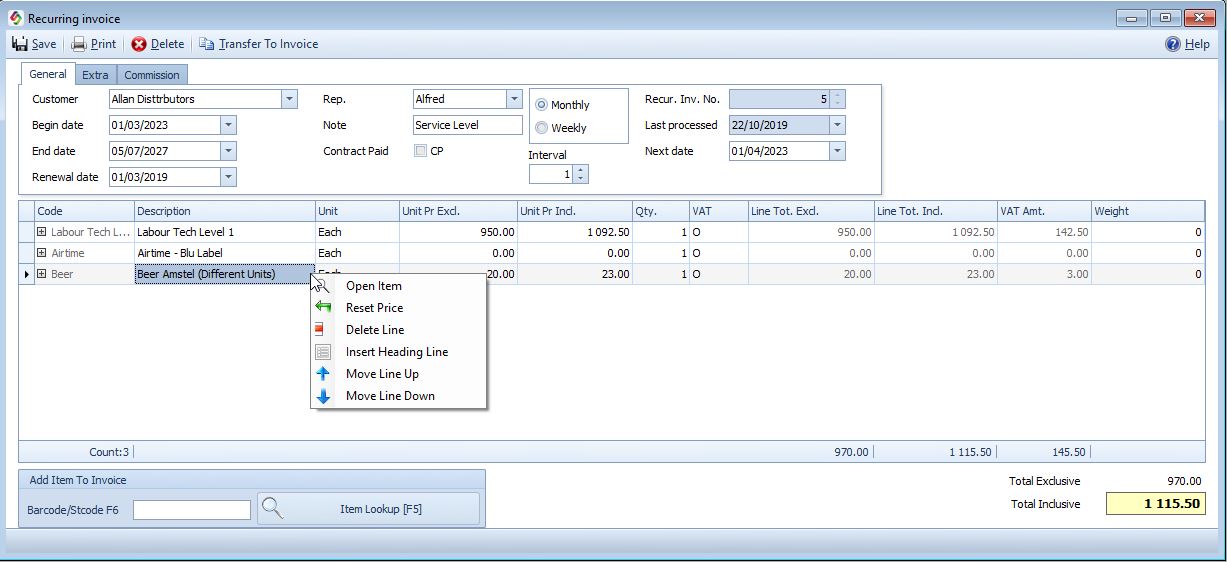
•Begin date: Start date of the contract.
•End date: Date the contract ends.
•Renewal date: The date on which the contract must be renewed.
•Last processed: Auto-updated with most recent billing date.
•Next Date: Next scheduled billing date. You can process the invoices within 25 days prior to this date.
•Rep: Representative (Salesperson) linked to this recurring Invoice.
•Note: Add internal notes (filterable in lookups).
•Billing Cycle: Choose between a monthly or weekly billing cycle. Schedule recurring invoices at regular intervals (e.g., weekly, monthly, annually or any multiples thereof) and end date
•Billing Cycle Interval:
Defines how often the invoice is generated within the selected billing cycle.
Example:
•Billing Cycle: Monthly
•Billing Cycle Interval: 12
→ The customer is billed once every 12 months
This allows billing monthly, bi-monthly, quarterly, annually, or any combination thereof.
The same logic applies to weekly billing (weekly, fortnightly, etc.).
Important:
Ensure the Quantity field on the recurring invoice line matches the interval if required.
Extra Tab - Field Description
Complete all required fields on this tab.
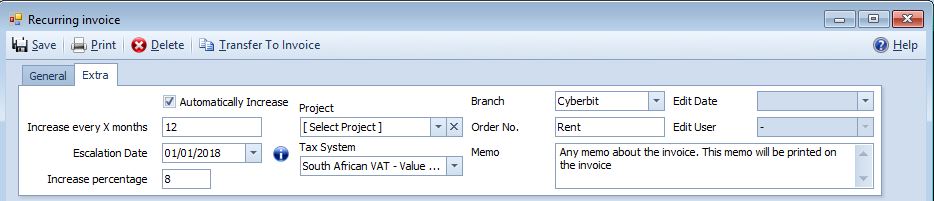
•Automatically Increase: Tick to enable auto price increases.
•Increase every X months: Interval for escalation (e.g., 12 = yearly).
•Escalation Date: First date the increase applies.
•Increase Percentage: The percentage by which the recurring charge will increase.
•Project: Link the recurring invoice to a Project or Branch for tracking and reporting.
Columns |
Description |
Discount % |
The discount % will be checked against the maximum line discount allowed by stock group |
http://bit.ly/SI_Add_Recurring_Invoice