Invoice Options: Credit Note |
Top Previous Next |
Hover the mouse over the different menu options. If the cursor changes to a hand ( ), then click to go to the subject.


Credit Note Options
Go to Invoice > Invoice Options and select the Credit Note tab.
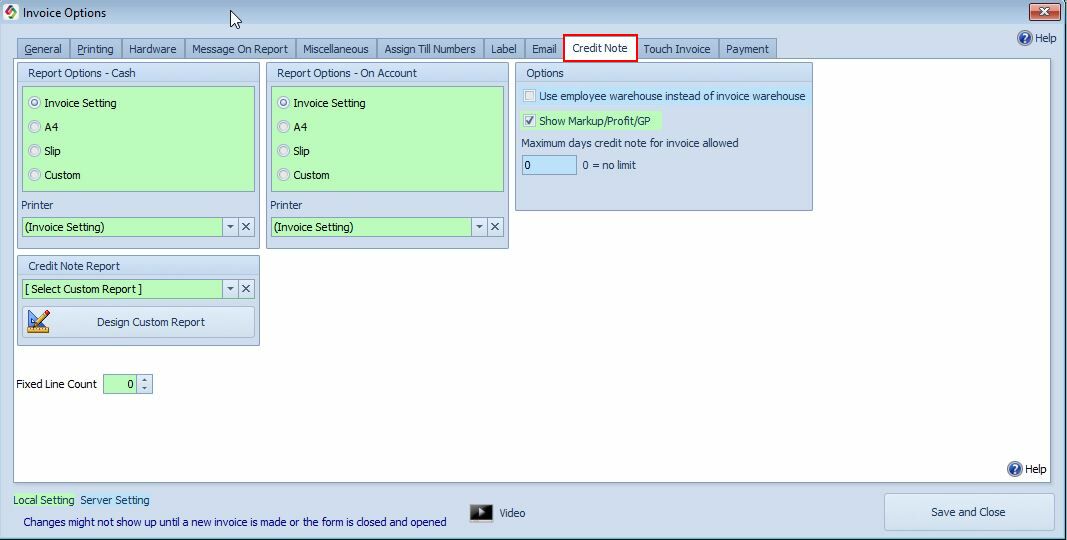
Credit Note Report Options |
Select the report format to use for credit notes: •Invoice Setting •A4 •Slip Report •Custom Report You can also select the printer that will be used when printing credit notes.
|
Invoice Setting |
When Invoice Setting is selected, the credit note will use the same report layout and printer settings as the invoice. See also: Invoice Report Settings
|
Design Your Own Credit Note Report |
Select an existing credit note template or create a custom report layout to meet your requirements. For more information, see Designing a Report. |
Use Employee Warehouse Instead of Invoice Warehouse |
Enable this option to use the employee's assigned warehouse instead of the warehouse specified on the original invoice when processing a credit note. |
Show Markup/Profit/GP |
Enable this option to display the following values on the credit note: •Markup •Profit •Gross Profit (GP) |
Maximum days credit note for invoice allowed |
Maximum Days Allowed for Credit Notes•Enter the maximum number of days a credit note can be issued for an invoice. •Once this period has expired, credit notes will no longer be allowed for that invoice. |
See also Designing a Report