Stock Extra: Currency Stock Revaluation |
Top Previous Next |
Hover the mouse over the different fields on the form. If the cursor changes to a hand ( ) , click to get more information.


Currency Stock Revaluation
Go to: Stock > Extra > Currency Stock Revaluation
Purpose
The Currency Stock Revaluation form recalculates the cost value of stock items purchased in foreign currencies when exchange rates change.
It updates the average cost price, adjusts the supplier list price where applicable, and posts the resulting stock value adjustment to the General Ledger.
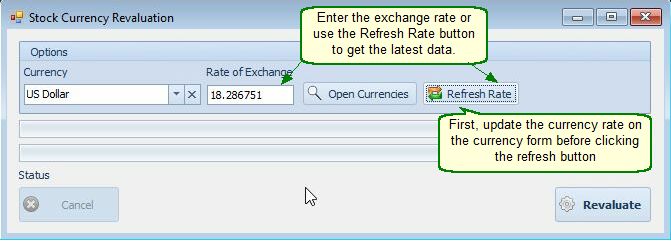
How to Revalue Stock
Step 1: Update the Exchange Rate
Enter the exchange rate manually, or click Refresh Rate to retrieve the latest rate from the Currency form.
Important: Before clicking Refresh Rate, ensure that the exchange rate has been updated in the Currency form.
Step 2: Revalue Stock
Click Revaluate to process the stock revaluation.
Smart-IT will:
•Recalculate the average cost price of applicable stock items using the updated exchange rate.
•Update the supplier list price according to the supplier's list currency.
•Post a stock adjustment journal to the General Ledger for the difference between the previous and revised average cost values.
•Update the relevant stock item details to reflect the revaluation.
Important Notes
•Buying Currency: Revaluation applies only to stock items with a buying currency specified on the Stock Form > Cost & Selling Prices tab.
•Exchange Rate History: During the Goods Received Note (GRN) process, the exchange rate is saved in the Stock Detail. This allows Smart-IT to use the original exchange rate when calculating the revaluation.
•Applicable Stock: Revaluation takes into account active purchases recorded through GRNs, based on the quantities currently on hand.
•Stock Value Adjustment: Smart-IT recalculates the stock value using the difference between the original and updated exchange rates. The resulting difference is reflected in a stock adjustment.
•Supplier List Price: The supplier list price, expressed in Rand, is updated using the applicable exchange rate and the supplier's list currency. This currency is determined by the supplier settings used during the GRN process.