Supplier Status Reconciliation: Supplier Statement Tab |
Top Previous Next |
Supplier Statement Tab
Handling Supplier Invoices Not Received
If invoices appear on the supplier’s statement but have not yet been received, you can capture them using the Supplier Statement tab. This tab is specifically designed for recording missing supplier documents.
How to Use
1. Open Supplier Reconciliation (Status Method)
2. Select the Supplier Statement tab
3. Capture the missing supplier invoices on this form
How It Works
•Amounts entered on this tab are included in Amounts in Dispute
•These amounts are excluded from the payable balance
•This ensures you do not pay for invoices that have not yet been received
For alternative methods see below.
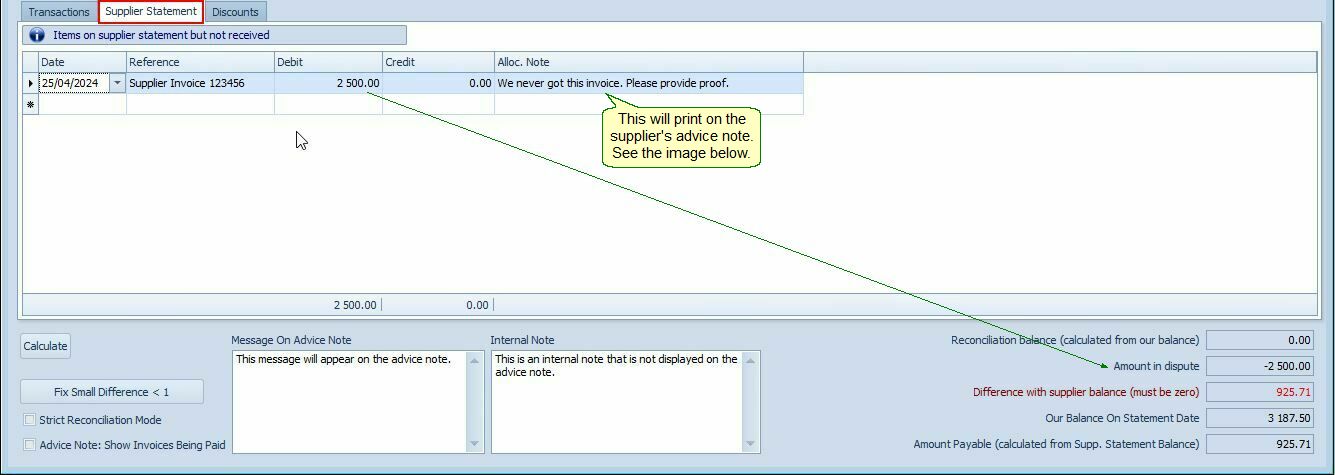
Use the above form to enter supplier invoices that you did not receive.
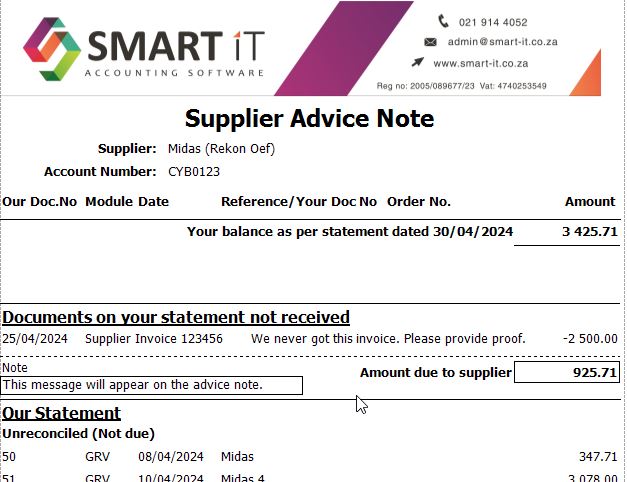
Alternative Methods
Option 1: GRV and RTS
•Create a GRV (Goods Received Note)
•Immediately process a RTS (Return to Supplier)
Option 2: Supplier Journal
•Create a Supplier Journal for the missing invoice.
•Mark it as “Less Goods Not Received”
Result:
The system excludes the amount from the payable balance until the invoice is received.
Notes
•The Supplier Statement tab is the preferred and most controlled method
•Use alternative methods only when required by your workflow
•Always ensure missing invoices are followed up and captured correctly once received